Audio Journaling: How to Capture Ideas Out Loud and Keep Them Organized
Published on October 7, 2026

Good ideas rarely show up while you're sitting at a desk. They arrive on a walk, in the car, or halfway through the dishes, and most of them are gone by the time you find somewhere to write. Audio journaling fixes that. You say the idea out loud the moment you have it, and it's saved in a place where you can find it, build on it, and share it if you want a second opinion.
What Is Audio Journaling?
Audio journaling is keeping a journal by speaking instead of writing. Each recording is an entry. The entries live together in one place, in order, so you can come back to them later.
You'll see it called a few different things: an audio journal, a voice journal, an audio diary, or a voice diary. They all describe the same practice. The difference that matters is what you use it for. A diary records what happened. An audio journal can do that too, but it's especially good at something a diary isn't built for: holding ideas that aren't finished yet.
Audio Journaling vs Writing
Writing asks you to organize a thought before you've finished having it. Speaking doesn't. That makes the two useful at different stages of an idea.
- Speed. Most people talk far faster than they type on a phone. A two-minute recording holds what would take a page to write.
- Timing. You can record while walking, driving, or cooking, which is when ideas tend to show up.
- Tone. A recording keeps how sure, excited, or doubtful you sounded. A written note loses that.
- Skimming. This is where writing wins. Text is faster to scan, so audio needs good titles and organization to stay useful.
A workable split: use voice journaling to get ideas out, and writing to refine the few that turn out to be worth keeping.
Verbal Processing: Why Saying It Out Loud Helps
Some people work out what they think by talking. This is often called verbal processing. If you've ever explained a problem to a friend and found the answer before they said a word, you've done it.
Journaling out loud gives you that without needing someone on the other end. Putting a half-formed idea into spoken sentences forces you to pick an order, fill the gaps, and notice the part that doesn't hold together. The recording is a bonus. The thinking happens while you talk.
An Idea Journal You Can Talk To
An idea journal is a single place for everything you might want to make, try, or fix: a business you keep circling, a chapter outline, a plan for the garage, a question you want to look into. The hard part of keeping one is getting ideas into it before they fade.
That's the case for capturing ideas by voice. It takes a few seconds, it works with your hands full, and you don't have to compress the idea into a headline to save it. People sometimes use a brain dump app or an idea capture app for this. An audio journal does the same job with less typing and more of the original thought intact.
What tends to be worth recording:
- The idea itself, in as many words as it takes
- Why it seems good right now
- What you'd need to find out before acting on it
- What you changed your mind about since the last entry
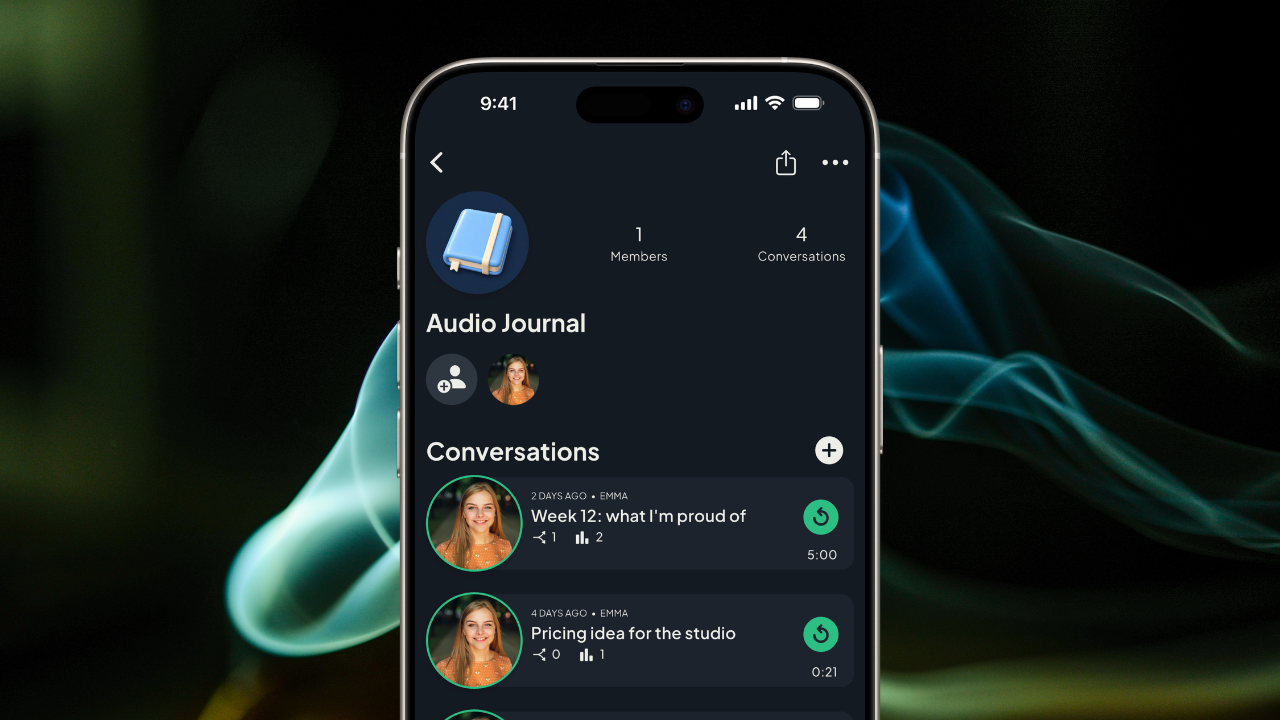
How to Organize Voice Memos So You Can Find Ideas Later
Recording is the easy part. The reason most voice memo journals fall apart is that nobody can find anything in a list of files named "New Recording 47." A few habits turn a pile of recordings into a working voice memo organizer:
Keep everything in one place. Ideas split across a recorder app, a notes app, and messages to yourself are as good as lost.
Title every entry. Five words is enough. "Pricing idea for the studio" will still make sense in six months.
Group by topic. Separate spaces for separate projects keep a novel outline from being buried under grocery thoughts.
One idea per recording. Short, single-subject entries are far easier to revisit than a twenty-minute ramble that covers six things.
Attach follow-ups to the original. When you have a new thought about an old idea, add it to that idea instead of starting a new file. The idea then reads as a thread you can follow from start to finish.
How to Start an Audio Journal
- Choose where it lives. Pick one audio journal app and commit to it, so every entry ends up in the same place.
- Record the next idea you have. Don't wait for a good one. The first entry only needs to exist.
- Name it before you put your phone away. Titling later doesn't happen.
- Listen back once a week. This is when you notice which ideas still sound good, and which ones belong together.
- Build on what holds up. Add a follow-up recording to the ideas worth keeping. Leave the rest.
From Private Journal to Shared Journal
Plenty of ideas should stay private, and an audio journal is a good home for them. Others get better when a second person hears them. A shared journal with friends lets you put an unfinished idea in front of people you trust and collect their reactions without scheduling a call.
This is where voice has an edge over a shared document. Friends hear how you actually feel about the idea, and they can answer the same way. Voice brainstorming across a few days often goes further than a single meeting, because everyone responds after they've had time to think.
It works well for:
- Two friends developing a project together
- A small group swapping ideas on a shared interest
- A mentor or peer who gives feedback when they have time
- Couples who want a shared space to talk things through
If you're choosing a shared journal app for this, look for two things: control over exactly who can listen, and a way to reply to a specific point in a recording instead of to the whole thing. Our guide to private voice messaging apps covers why closed groups matter.
Using Roads Audio as an Audio Journal App
Roads Audio is built around private channels, and a channel makes a natural voice journal. Create one, call it Audio Journal, and record into it whenever an idea shows up.
- It's organized by default. Every recording has a title and sits in order with the rest. Make a separate channel for each project if you want to keep topics apart.
- There's no time limit. A ten-second note and a long think-aloud both fit.
- Follow-ups stay attached. Reply to a specific moment in an earlier recording, and your new thought is linked to that exact point.
- It's private until you decide otherwise. Only people you invite can hear a channel.
- Transcripts make it skimmable. The one place writing beats audio is scanning back through old ideas. With Roads Audio Plus, the paid plan, every recording is transcribed, so you can read through an entry to find the part you need instead of listening to all of it. Recording, listening, and replying by voice are free.
- Sharing turns it into collaborative voice notes. Invite a friend and they can listen on their own time and reply to the moment that caught their ear. Your idea and their responses stay together as one conversation.
That last part is what a plain voice notes app can't do. You can share voice memos with friends from any recorder, but the replies come back as separate files with no connection to what they're answering. In Roads, the feedback lives on the idea.
Audio Journaling FAQ
What is audio journaling?
Audio journaling is recording your thoughts and ideas by voice instead of writing them down. Each recording is an entry, and the entries stay together in one place so you can listen back, organize them, and build on them later. It is also called a voice journal, an audio diary, or a voice diary.
Is audio journaling better than writing?
Neither is better for everyone. Speaking is faster and keeps your tone of voice, which makes it good for capturing ideas while they are fresh. Writing is easier to skim and edit. Many people use an audio journal to get ideas out and writing to refine the ones worth keeping.
How do I organize voice memos so I can find them later?
Keep every recording in one app, give each one a short descriptive title, group them by topic or project, and keep each recording to a single idea. A new thought on an old idea should be attached to the original recording instead of saved as a separate file.
Can I share an audio journal with friends?
Yes. A shared journal works well for ideas you want feedback on. In Roads Audio you keep your journal in a private channel and invite the people you choose. They listen on their own time and reply by voice to the exact moment they are responding to.
Say the Next Idea Out Loud
The benefits of audio journaling come from one small change: when an idea shows up, you say it instead of hoping you'll remember it. Give it a title, keep it with the others, and come back to it when you have time. If it's worth a second opinion, you'll already have something to share.
Try Roads Audio Free Today
Start an audio journal in a private channel. Capture ideas by voice, keep them organized, and invite a friend when you want to think it through together.