Async Standup Apps: Voice Updates for Remote Teams
Published on April 13, 2026

Daily standups made sense when everyone worked in the same office. For distributed teams spread across time zones, the synchronous meeting format often creates more problems than it solves.
The Problem with Synchronous Standups
The classic standup is simple: everyone gathers briefly to share what they did yesterday, what they're doing today, and what's blocking them. In person, this takes 10-15 minutes and keeps teams aligned.
Remote teams run into friction. Finding a time that works for people in New York, London, and Singapore means someone is always joining at an unreasonable hour. The meeting that's supposed to take 15 minutes balloons when people ramble or get into side discussions. And for something that happens every single day, even small inefficiencies compound quickly.
Some teams give up on standups entirely. Others slog through awkward video calls where half the team looks half-asleep. Neither approach actually solves the underlying goal: keeping everyone informed without wasting time.
What Async Standups Look Like
An async standup removes the requirement that everyone be present at the same moment. Instead of a meeting, team members share their updates whenever it fits their schedule, and others catch up when they have time.
The simplest version is text-based. People post updates in Slack or a project management tool. This works, but it loses something. Text updates tend to be short and dry. Reading through a dozen written statuses feels like homework.
Voice-based async standups offer a middle ground. Team members record short audio updates instead of typing them. Listeners can play them back at 1.5x speed while doing other things. The human element stays intact without the scheduling headache.
Why Voice Works for Standups
Speaking is faster than typing for most people. A two-minute voice update can cover more ground than five minutes of carefully composed text, and it takes less effort to produce.
Voice also carries context that text strips away. You can hear when someone is excited about a breakthrough or frustrated with a blocker. These cues help teammates understand what's actually happening, not just what's being reported.
For listeners, audio updates fit into time that would otherwise go unused. Catching up on team updates during a commute, a walk, or while making coffee turns dead time productive without adding another block to the calendar.
How Teams Use Async Standup Apps
Different teams structure their async standups differently, but a few patterns work well:
Morning updates, flexible window. Team members record their update sometime during their morning. A 3-hour window accommodates different schedules without the precision required for a live meeting. By the time everyone's workday is underway, all updates are available to listen to.
Threaded replies for follow-ups. When someone's update raises a question, teammates can reply directly rather than waiting for the next day's standup. These threads stay attached to the original message, keeping context intact.
Weekly recaps instead of daily. Some teams find daily standups excessive for their workflow. Weekly voice updates give everyone a richer picture of what happened without the overhead of daily check-ins.
Project-specific channels. Rather than one standup for the whole team, some organizations create separate channels for different projects or working groups. Updates stay relevant to people who actually need them.
What to Look for in an Async Standup Tool
Not every voice messaging app works well for team standups. A few features make a significant difference:
- Recording should be quick and frictionless. If it takes multiple taps to start, people won't bother.
- Messages should stay organized. Random voice notes in a chat thread get lost. Proper threading and timestamps keep updates findable.
- Playback speed controls help listeners get through updates efficiently.
- The tool should work well on mobile. Not everyone records from their desk.
Roads Audio for Team Standups
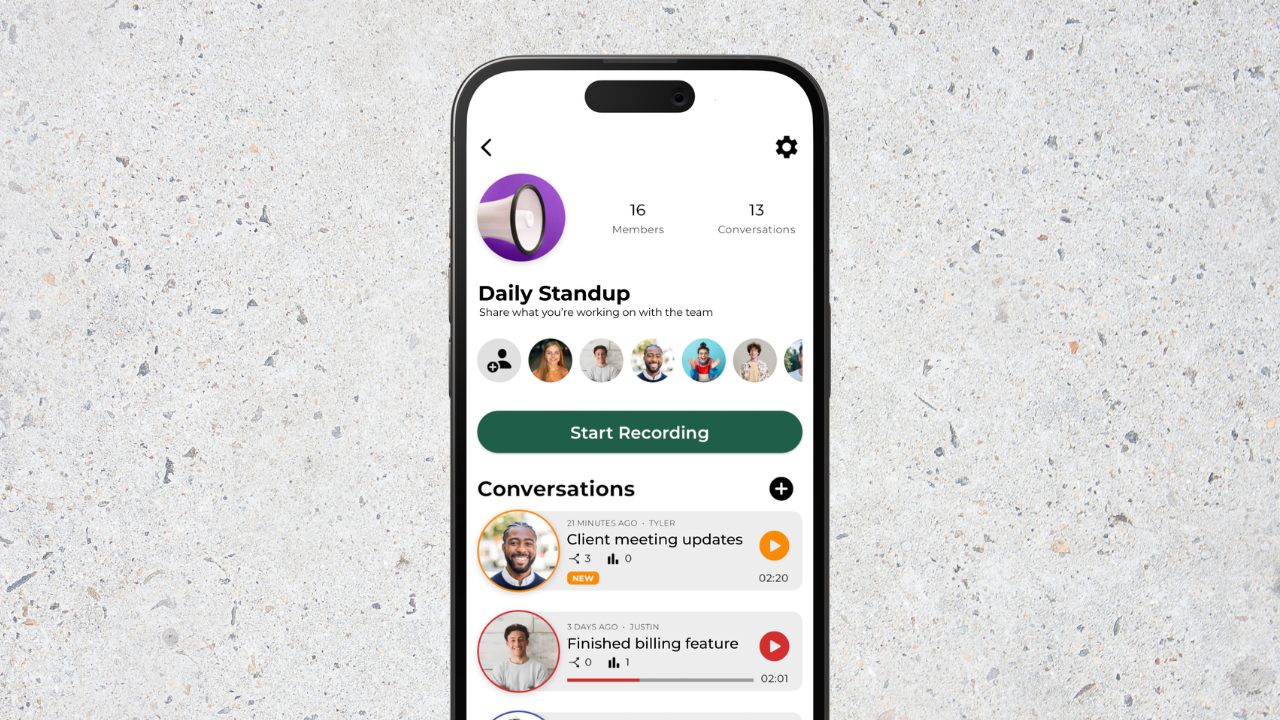
Roads Audio is built around async voice conversations. Teams create a dedicated channel for standups, and members record their updates whenever it fits their schedule. Messages appear in a timeline with threaded replies, so follow-up discussions stay connected to the original context.
Recording takes a single tap. Playback supports speed adjustments for Roads Audio Plus subscribers. The app works on both iOS and Android, and teammates can listen and respond from wherever they are.
For teams exploring async standups, Roads offers a lightweight way to try the format without committing to complex workflow tools. Create a channel, invite the team, and see if voice updates work better than yet another meeting.
Learn more about micro podcasts and how the format applies to teams and communities.
Making the Shift
Switching from synchronous to async standups requires some adjustment. Team members need to get comfortable recording themselves. Managers need to trust that updates will happen without a scheduled accountability moment.
The payoff is significant: hours reclaimed from unnecessary meetings, updates that teammates can actually absorb, and a format that respects people's time and attention. For distributed teams tired of awkward video calls that could have been a voice message, async standups offer a better way forward.
Try Roads Audio Free Today
Replace your daily standup meeting with async voice updates. Create a team channel and start sharing updates that teammates can listen to on their own time.